



UX vs. UI in the age of AI: The difference just got more important
The UX vs. UI conversation Is worth having again
AI isn't blurring the line between UX and UI. It's exposing why the distinction matters in the first place.

For years, the UX vs. UI debate was mostly a matter of clarifying roles. UX designers figured out how a product should work. UI designers made it look good. The two disciplines had a reasonably clean handoff, and most teams found a way to make it work.
AI has complicated that picture significantly, and not in a way that makes the distinction less relevant. If anything, it's sharpened it. When a product can generate its own interface, adapt its behavior based on context, and make decisions on behalf of users, the question of who is responsible for the experience and who is responsible for how it looks becomes more consequential.
UX is still about how a product feels to use. UI is still about how it looks. But what each of those means to design for has fundamentally shifted.
What UX design means now
User Experience design has always been about solving for the person using the product. This entails understanding what they need, structuring the flow around that need, and removing noise at every step. That core purpose hasn't changed. What's changed is what UX designers are asked to define.
In a traditional product, the experience was predictable by design. A user clicked a button, something happened. The flow was authored, tested, and shipped. UX work was largely about making that authored sequence as clear and usable as possible.
AI-driven products don't work that way. They interpret signals, generate responses, adapt over time, and make decisions the designer never explicitly scripted. In this context, the experience isn't a fixed sequence anymore. It becomes a behavior. And behavior has to be defined before it can be designed.
This shifts the UX work upstream in a significant way. It's no longer enough to wireframe a flow and test whether users can complete it. UX designers working on AI products are increasingly being asked to define how the product should reason: what signals it should pay attention to, when it should act independently, when it should ask for confirmation, and how it should communicate decisions back to the user in a way that builds trust.
That's a different kind of problem than laying out a navigation structure. The grocery store is a useful analogy. UX is the layout, the logic of how the space is organized so people can find what they came for. But now, some of the aisles rearrange themselves based on who walks in. Designing for that requires thinking about intent and decision logic, not just sequence.
The core responsibilities of UX, including research, information architecture, user flows, and usability testing, are still an important part of the job. But the surface area has grown to include something closer to behavioral design: defining how an intelligent product should act, not just what it should show.
What UI design means now
User Interface design has always been the discipline responsible for translating structure into a finished visual experience: color, typography, hierarchy, component systems, interactive states, the small moments of feedback that make an interface feel alive and responsive.
That hasn’t gone away. But AI has introduced a complexity that UI designers are only beginning to fully grapple with. Interface is no longer a fixed artifact.
Generative UI, that is, interfaces that adapt, assemble themselves, or change based on context and user behavior, is beginning to move beyond experimentation and into real-world products. Design systems that once governed a finite set of screens and components now have to account for surfaces that get generated rather than authored. The question shifts from "does this component look right?" to "does this component system produce the right output across conditions we didn't fully anticipate when we built it?"
This means UI designers increasingly need to think like architects of systems. The visual language, the component logic, and the rules for how elements relate to each other need to be robust enough to hold up when the interface is being assembled dynamically, not manually.
Back to the grocery store: if UX is the layout, UI is the signage, the lighting, the shelf design, the visual language that helps people navigate and trust the space. In an AI-driven product, some of that signage is generated in real time. The UI designer's job is to make sure the rules governing that generation are coherent enough that the store still feels like one store, not a different one every time you walk in.
Users don't automatically trust AI-driven interfaces. Trust is built through consistency, clarity, and the feeling that someone who cared about the experience made deliberate decisions about how it behaves. That's still a UI problem, even when the interface is partially generated.
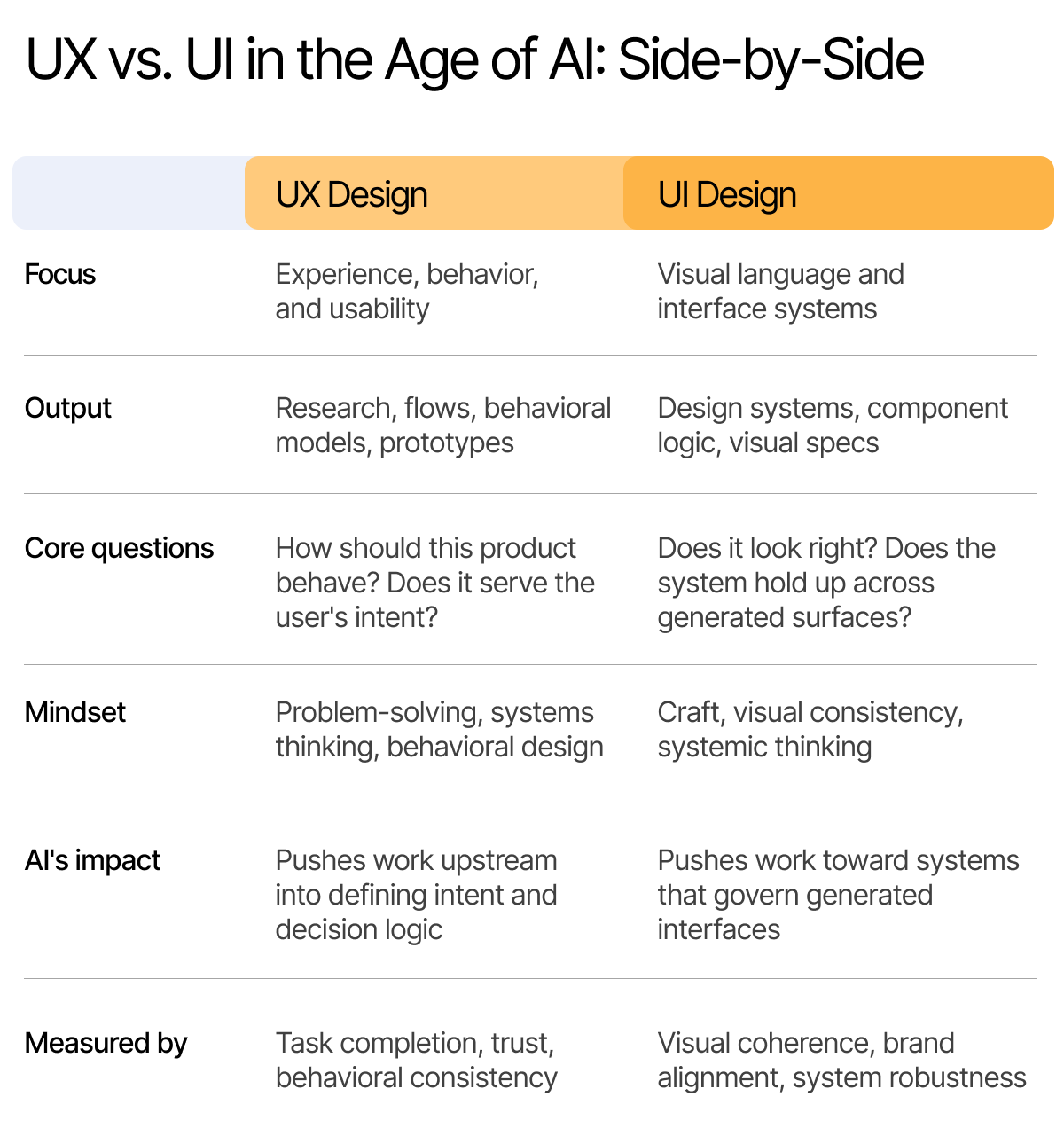
How they work together and why that matters more now
The relationship between UX and UI has always been interdependent, but AI makes the coordination between them more critical because the stakes of misalignment are higher.
When UX hasn't defined how the product should behave and why, AI fills that gap on its own terms, often inconsistently, leading to unpredictability or broken trust. Hallucinations and strange model behavior are often framed as technical failures. In some cases, though, they're likely definition failures: nobody specified clearly enough what the product was supposed to do in a given context, so the model did its best with incomplete guidance.
When UI hasn't built a system robust enough to govern dynamic surfaces, visual coherence breaks down in ways that users can't articulate but absolutely feel. The product looks different depending on the context. Elements don't behave the way the interaction model implied they would. The experience feels slightly off in ways that quietly undermine confidence.
The typical workflow in which UX defines structure and UI brings it to life visually still applies. But in an AI context, it has to be a collaboration rather than a linear handoff. UI work often exposes gaps in behavioral definition. UX decisions have direct implications for how a design system needs to be structured. The two disciplines inform each other continuously, and in a product where behavior is dynamic rather than scripted, that feedback loop has to be tight.
The takeaway
UX and UI have always been different disciplines answering different questions about the same product. That's still true. What's changed is the complexity of the questions.
UX is no longer just about designing a clear path from A to B, nor is UI just about making a fixed set of screens look good. Neither discipline has become less important. Both have become more complex and more interesting, in the ways that matter for building products people can rely on.
If you're thinking through what this shift means for your team or your product, let's talk.
About HTEC Momentum
HTEC Momentum is the product and design practice within HTEC Group, a global AI-first provider of complex software and hardware embedded design and engineering services. Formerly known as Momentum Design Lab, LLC, we have been building digital products for over 24 years — born and raised in Silicon Valley, championing user experience before UX was a recognized discipline.
Now operating as HTEC Momentum, the practice brings together the deep product thinking and human-centered design roots of Momentum Design Lab with the global engineering scale of HTEC. The result is an end-to-end capability: strategy, product management, design, and AI-native software development under one roof.
Whether you knew us as Momentum Design Lab or you’re meeting us as HTEC Momentum, the approach is the same. Ask the hard questions first. Build the right thing second.

FAQ
Frequently Asked Questions
Does UX or UI come first in the design process, and does AI change that?
UX still comes first structurally. You need to understand the user and define the experience logic before UI has a surface to work on. AI doesn't change that sequence, but it does change what "done" looks like at the UX stage. Defining a flow is no longer sufficient. You also need to define how the product should behave in conditions not explicitly anticipated by the flow. That makes the UX phase more demanding before UI work even begins.
Is UX design the same as web design?
No. Web design is a specific output. UX design is a methodology that applies to any product or experience, including apps, platforms, AI-driven tools, service experiences, and yes, websites. In an AI context, UX work extends further into defining product behavior and decision logic than traditional web design ever required.
What's the difference between UX and product design?
The terms are often used interchangeably, but product design typically carries a broader mandate. A product designer usually takes ownership of the full design of a product -- which includes UX thinking, visual design, and often strategic input into what gets built and why. In the current environment, that mandate increasingly includes thinking about behavioral design and how AI capabilities get shaped into a coherent product experience.
What's the difference between UX and CX (customer experience)?
UX is a subset of CX. Customer Experience covers every touchpoint a person has with a company, including marketing, sales, support, billing, and the product itself. UX focuses specifically on the product interaction. In an AI-driven context, that boundary is getting blurrier, as AI increasingly mediates touchpoints that used to sit clearly in CX territory: support conversations, personalized communications, and onboarding flows. But the underlying distinction still holds: UX is about the product experience specifically, and improving it is necessary but not sufficient for improving the full customer relationship.
Download this white paper
Complete the form below to download your copy of the report and find out how to accelerate growth through extraordinary customer experience.


Let’s partner to move your business forward.
Leave your details and we’ll get back to you.
Looking to join our team?
Visit our Careers page